When your portfolio stops feeling like “play money” and starts looking like real savings, a hardware wallet is what keeps it safe. It’s a dedicated device built for one job: protect your keys from everything on your phone and laptop.
Instead of trusting a browser extension or an app, your private keys live inside the hardware wallet’s tamper-resistant secure chip, offline. When you want to move funds or sign a DeFi transaction, the request goes to the device, you double-check the details on its screen, and approve with a physical button press.
The keys never leave the device, the signature goes back to your wallet app, and the blockchain sees a valid transaction—without your secrets ever touching a potentially compromised computer. That’s why long-term holders, high-net-worth users, and serious DeFi participants treat hardware wallets as their “vault,” not just another app.
What Is a Hardware Wallet?
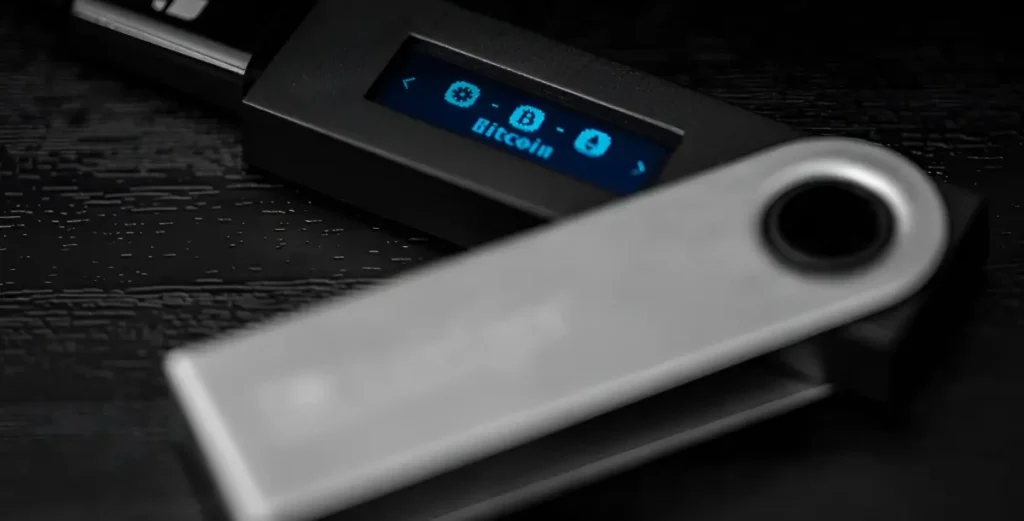
A hardware wallet is a dedicated physical device that stores the cryptographic private keys to your cryptocurrencies (like Bitcoin, Ethereum, and stablecoins) in secure hardware, away from the internet. It can look like a small USB stick, a chunky gadget with a screen, or even a card—but the idea is the same: it generates your keys inside the device and never lets them leave.
When you send crypto or interact with DeFi, your phone or computer prepares the unsigned transaction and sends it to the hardware wallet. The device signs the transaction internally, then sends only the signature back to your wallet app, which broadcasts it to the blockchain. Your keys stay locked inside the device the whole time.
If the hardware wallet is lost, stolen, or damaged, you don’t lose your funds. During setup, the device shows you a 12–24-word recovery phrase (also called a seed phrase, compliant with the BIP-39 standard). You write this down on paper and store it safely offline. That phrase is the master backup to your keys.
If you ever need to, you can restore your wallet—and all your assets—on a new hardware wallet or compatible wallet app using that recovery phrase. This setup makes hardware wallets a popular choice for anyone who wants stronger protection than an exchange account or browser wallet, without needing to understand every technical detail.
How a Hardware Wallet Works
A hardware wallet keeps your private keys in secure hardware and performs every critical action—key creation, address verification, and transaction signing—inside the device. Your phone or computer only prepares an unsigned transaction and relays the signed result to the network; the keys never leave the device. With that in mind, the flow works in four stages
1. Key generation
The device creates entropy internally and derives a master private key plus a human-readable 12–24-word recovery phrase (BIP-39 seed). From that seed it can deterministically derive unlimited account keys (BIP-32/44) without ever exposing the seed to your computer. Optional passphrase support adds another layer that creates a separate vault from the same words.
2. Address verification
When you generate a receive address, the device renders it on its own screen so you can compare it to what you see in the app. This defeats clipboard-swapping malware, spoofed QR codes, and phishing overlays because the device is the source of truth. Always verify the entire address on the device—especially after changing accounts, derivation paths, or networks.
3. Offline signing
Your wallet app constructs an unsigned transaction and sends it to the device via USB/Bluetooth or as a Partially Signed Bitcoin Transaction (PSBT)/QR code (for fully air-gapped flows). The device displays critical details—asset, network, amount, destination, and fees—so you can confirm or reject. It signs inside secure hardware and returns only the signature to the app for broadcast; the private key never leaves the device.
4. Secure hardware and firmware
Modern models use a secure-element (SE) chip to store secrets, with anti-tamper features and a locked-down OS. Firmware updates are vendor-signed to prevent malicious code, and leading devices provide transparency through open-source apps or reproducible builds for independent review. Together, these controls harden the device against physical extraction, rogue updates, and supply-chain attacks.
Hardware Wallet vs Software Wallet
Both hardware and software wallets are non-custodial tools that let you control your private keys, but they handle risk very differently.
A hardware wallet is a dedicated device that keeps keys in isolated, tamper-resistant hardware and signs transactions offline. A software wallet is an app on your phone, desktop, or browser that stores and uses keys within the device’s operating system—faster and free to start, but exposed to malware, phishing, and browser attack surfaces.
Here’s a comparison of how these two differ:
| Dimension | Hardware Wallet | Software Wallet |
| Key storage | Offline in a secure device chip | On phone or computer OS |
| Attack surface | Strong against malware and browser phishing | Exposed to device malware and clipboard attacks |
| Convenience | Extra step to confirm on device | Fast and simple to use |
| Cost | Requires purchase | Often free |
| Best for | Savings, long-term holdings, larger balances | Small balances, frequent micro-spend |
What a Hardware Wallet Protects Against
A hardware wallet is designed to solve one critical problem: it keeps your private keys isolated from the internet and forces you to confirm every action on a trusted screen with physical buttons. This separation breaks the most common attack chains on phones and laptops where malware thrives.
It’s important to note, however, that a hardware wallet does not eliminate human error or poor security habits. You remain responsible for protecting your recovery phrase, scrutinizing transactions before you approve them, and avoiding unlimited smart-contract approvals. A hardware wallet hardens the technology, but your own awareness and practices are still essential.
Below are the specific threats a hardware wallet protects you from, and how it does so.
Malware and Key-logger Theft on Your Computer or Phone
Your private keys never leave the device. The wallet generates and stores your seed phrase within a secure element, signs transactions internally, and sends only the completed signature to your connected app. This means that even if your computer is infected with spyware or remote-access tools, attackers cannot steal your keys. An additional PIN or passphrase, along with firmware signature checks, provides another layer of security against physical tampering.
Clipboard Address Swaps
Malware can secretly replace a crypto address you copy with one belonging to an attacker. A hardware wallet protects you by requiring that you verify the exact recipient address and transaction amount on its own trusted screen before final approval. Because you’re confirming the destination on the device itself—not on your potentially compromised browser—a clipboard swap is caught at the last moment. Many wallets also support address labeling or whitelisting to make verification faster and harder to spoof.
Phishing Pages That Try to Make You Sign the Wrong Transaction
Fake websites and wallet pop-ups can display one transaction while asking you to sign something completely different. A hardware wallet defends against this by displaying the true transaction details—such as the network, recipient, function, and amount—directly on the device. It’s important to disable “blind signing” when possible and enable contract data parsing, so approvals show clear, human-readable information instead of confusing code. If what you see on the wallet’s screen doesn’t match your intent, you simply don’t sign.
Hardware Wallet Secure Setup Checklist
Get the basics right on day one. Follow this sequence to harden key storage, verify backups, and test your flow before you move real value.
- Buy from the manufacturer or an authorized reseller. Avoid marketplace listings. Type the URL yourself, check for HTTPS, and keep the receipt and box serials for warranty and audits.
- Initialize the device yourself. Generate the seed on the device. If the device shows a pre-printed or pre-generated seed phrase, treat the device as compromised and do not use it.
- Record the 12–24 words offline on durable media. Write by hand on paper or use a steel backup. No photos, screenshots, cloud notes, printers, or scanners. Store copies in separate locations.
- Set a strong PIN and, if supported, a passphrase. Use at least 6–8 digits for the PIN and avoid patterns. A passphrase acts like a 25th word; memorize it and never store it with the seed.
- Update firmware via the official app only. Verify you are using the vendor’s site and software. Update over a trusted computer and cable. Confirm the version shown on the device screen.
- Verify receive addresses on the device display. Always check the full address on the hardware screen before sharing it or receiving funds. Label accounts so future checks are quick and consistent.
- Send a small test transaction first. Confirm you can receive and spend from the wallet. Match the transaction details on the device and in your explorer before proceeding.
- Practice a full recovery before depositing more. Wipe a spare device (or use a dry-run mode), restore with your seed and passphrase, and confirm the restored addresses match. Only proceed then to move larger balances.
Seed Storage and Disaster Recovery
Protect the thing that actually holds your money: the secret words. Set up backups early, store them well, and rehearse recovery so you are never guessing under pressure.
- Recovery phrase: This is the only way to restore funds after loss or damage. Create two copies, store them in separate, secure locations, and keep them offline on paper or steel.
- Passphrase (advanced): An additional word that derives a different (or “hidden”) wallet. Memorise it and never store it with the seed; if you forget it, access is gone permanently.
- Shamir backups or multisig: Split a secret into shares or require multiple devices to sign. Use this for higher assurance, with clear rules on who holds each share and how recovery works.
Frequently Asked Questions
Is a Hardware Wallet “Cold Storage”?
Yes. A hardware wallet is a form of “hot-to-cold” storage because your private keys stay offline and transactions are signed inside the device. Your app sends unsigned data in, gets a signed transaction back, and the keys never touch an internet-connected phone or laptop. Some models even support fully air-gapped use via QR codes or microSD, with no cables or Bluetooth.
Can a Hacker Drain Funds If They Steal the Device?
Generally no, unless they also have your PIN (and passphrase, if you use one). After several wrong PIN attempts, most devices wipe themselves. In practice, the real target is your recovery phrase: if someone gets those 12–24 words (and any passphrase), they can recreate your wallet. Protect the phrase like cash and keep it strictly offline.
What Happens If I Lose the Device?
You don’t lose your funds; you replace the device. Your crypto lives on the blockchain, and your 12–24-word recovery phrase lets you restore the same wallet on a new hardware wallet or compatible app. If you used an extra passphrase, you’ll need to enter it exactly. It’s wise to do a test recovery with a small amount before you store serious value.
Can I Use DeFi and Staking With a Hardware Wallet?
Yes. You connect the device to a wallet interface (browser, desktop, or mobile), then approve each DeFi or staking action on the device screen. Your keys stay offline while you interact with dApps. Just review prompts carefully, avoid unlimited spend approvals where possible, revoke old permissions regularly, and stick to audited, reputable protocols.
Should I Use Two Devices?
For larger balances, using two devices is sensible. One can be your “daily” device and the other a backup or “vault” device stored separately, so you’re not locked out if one fails or is lost. More advanced users and teams may use multisig or Shamir-style backups to spread risk across people or locations, so no single point of failure can move all funds.
Hardware Wallets as the Foundation of Self-Custody
A hardware wallet isolates your private keys from malware and phishing by signing transactions inside secure hardware.
Security still rests on user behaviour: protect the recovery phrase, verify addresses on-device, and test recovery before relying on it. Choose a model that fits your workflow and threat model, and upgrade to multisig or MPC for team-level controls.
Behind the scenes, many of the safer, more reliable platforms you use don’t run everything themselves. They lean on infrastructure providers like ChainUp for institutional-grade custody, MPC wallet orchestration, policy-based approvals, segregated accounts, and audit-ready controls—plus integrated compliance tools (KYT, Travel Rule) and exchange connectivity.
If you’re on the builder side and want your users to get that same level of protection, ChainUp can provide the underlying wallet and custody stack so your app feels simple on the surface while the security, compliance, and trading plumbing stay robust in the background. Book a demo with ChainUp today.